Line Tool
 The Line Tool draws lines. A Line Tool object can intersect other objects, and its endpoints can be connected to anchor snaps.
|
Line Tool Examples |
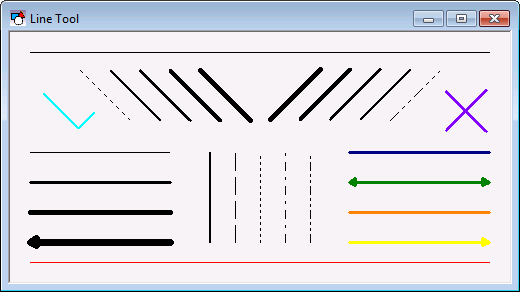
If you group line objects that have touching endpoints, the lines will be grouped to form a Polyline object. To group lines with touching endpoints without forming a Polyline object, hold down the Ctrl key when clicking the Group option on the Draw menu.
To draw a vertical, horizontal, or 45-degree line, hold down the Shift key while dragging to create the line. Use the RotateAngle property to set the line to a specific angle.
The line color is specified by the ForeColor property. The line width is specified by the PenWidth property. The line style is specified by the PenStyle property. Only a solid line can have a PenWidth greater than 1 pixel. The Arrowhead and ArrowheadHeight properties specify if the line has arrowheads and the arrowhead height.
A Line Tool object does not show text. To show text with a line, you must use both a Line Tool object and a Text Tool object. However, a Line Tool object can show the status of a point. To associate the object with a point use the point identifier properties to form a fully qualified CygNet tag string. The point identifier properties are [1:SiteService], [2:Point ID], [3:Long Point ID], [4:Facility ID], and [5:UDC]. If the object is on a templated screen, only use the [5:UDC] property.
The [AlarmElement] property can be set to show the point state color in the object’s Foreground Color or not at all (None). When set to None, the color specified for the line is shown. If set to Foreground Color, the line color is replaced with the point state color.
The [UseCustomStateColors] property enables the object to use its own custom point state colors. If set to 1 - Yes, the colors used are those defined by the object’s [CustomStateColors] property. If set to 0 - No, the colors are those defined by the TheView’s [CustomStateColors] property.
More:


